PrimeOnePlay - RK3568
Item No. 228366 (without LTE); Item No. 228324 (with LTE)
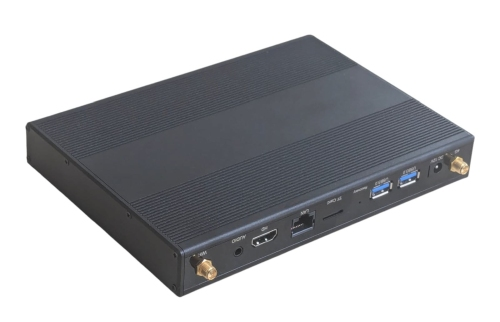
This player is designed for digital signage applications or mini servers. It features a Rockchip 3568 CPU with 8 GB of RAM. This player is available with or without LTE.
There are two firmware versions for this player: CTM firmware, developed for digital signage devices, and a Google-certified version.
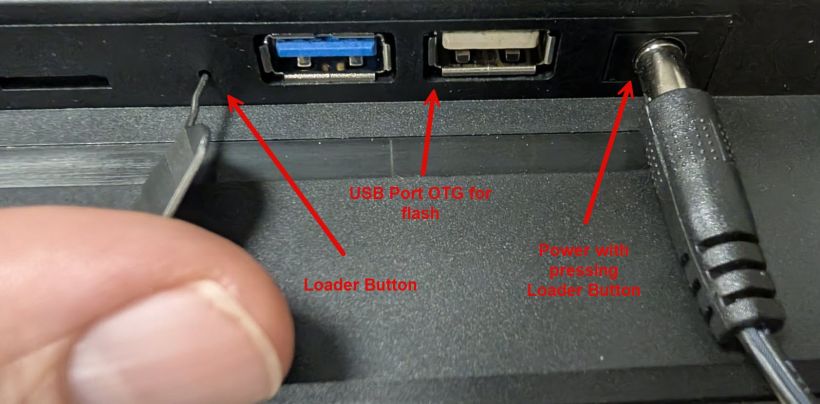
These players are flashed just like our PrimeOne tablets. To enter loader mode, please follow the instructions in the image. Press and hold the loader button for about 3–5 seconds after powering on the device. A "Loader Device" will then appear in RKDevTool.
Firmware:
ADB Driver Program DriverAssistant_v5.12: Download
Flash Software RKDevTool 3.13: Download
Manual: Download
Android 13 CTM: Download
Android 13 GMS: Download
Android 13 LTE Version: Download
Instructions for flashing:
If no ADB device is detected, you must tap the build number seven times in Settings/About the Tablet. This will enable developer mode. You can then find it under Settings/System. There, you must enable USB debugging. You must also disable "Turn on USB Host" under Settings/System.
Note: When switching to an unlicensed version of Google or to Linux, you must click "Erase All" in RKDevTool under "Advanced Functions."
- Install the "Release_DriverAssitant" driver.
- Launch the RKDev tool
- Connect the blue external USB-A port next to the power jack to the PC, and plug in the power adapter
- You should now see an ADB device in the RK-Dev Tool. Then press the "Switch" button in the RK-Dev Tool. The device will reboot into loader mode after a few seconds. You may need to enable debugging on the player. If the ADB device disappears, you can also disable USB host mode under Settings/System/.
- Click the "Firmware" button under the "Upgrade Firmware" tab and select the Linux/Android image.
- Press the "Upgrade" button. The firmware should now be uploaded to the tablet.
- The device will restart automatically after the update is complete.